
What Synchronyze does
Run the whole business from one place. Everything below is live today.
Six capabilities
- Quoting: Quote the work, send it and win it, all in one place.
- Invoicing: Build up the maintenance invoice from the rate schedule.
- Work sprints: Plan tasks to people in a backlog and sprints.
- Forecasting: Forecast cost against budget and see the work ahead.
- Client portal: Clients see their jobs, photos, documents, quotes and comments.
- Asset register: Plant and fleet register with service reminders.
Quoting
Price the job, send it, get it signed.
- Build the estimate line by line, with a markup on each line
- Maintenance work prices itself from the client's rate schedule
- Send a branded quote as a PDF from your own email, with your logo
- The customer signs online and the estimate moves to Won
- Turn a won quote into a job on the board
- Track every quote in the quoting register: draft, sent, won or lost
Invoicing
Know what to bill, built from the rate schedule.
- Preview the monthly maintenance invoice for each council client: work lines, admin time, CPI and GST
- Every line is priced from the client's rate schedule
- Log admin hours and set the CPI percentage for each client
- A line that cannot be priced is flagged, never shown as zero
- Jobs move to Invoiced on the board once the work is billed
Work sprints
Plan the work, task by task.
- Plan tasks to people across jobs on the works program
- Keep a backlog and pull tasks into sprint columns
- Drag tasks between sprints, on a phone as well
- Link a task to a shift when you need to
- Save the works program as a PDF
Forecasting
See cost overruns before they happen.
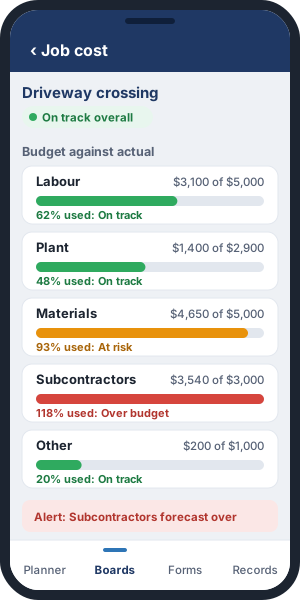
- Every job forecasts its cost against budget, by category
- An over-budget alert fires when a category is forecast to blow out
- Health at a glance: on track, at risk or over budget
- See the value of open work by the week or month crews first attend
- Break it down by client, board, work type or stage, and export it to CSV
Client portal
Your clients see their jobs without phoning you.
- Invite people at the client by email. They sign in with a link, with no password
- Clients see their jobs and where each one is up to
- Share photos and documents job by job
- Clients read and post comments, and your team is told
- Clients see their quotes and can view and accept them
- You choose what each client sees, and can preview exactly what they see. Costs, budgets and rates are never shown
Asset register
Every machine in one register.
- A plant and fleet register: Plant ID, make, model, year, registration and rego expiry, VIN, engine number, assigned driver and status
- Import your fleet from a spreadsheet
- Service due is worked out from each machine's maintenance schedule, and an overdue machine says so
- Keep every service, repair and inspection in the machine's maintenance history
- Pre-start forms fill themselves in from the machine
Smart alerts
If something's wrong, Synchronyze tells you.
- A pre-start has not been done before work starts
- A project is tracking over budget, or a cost line is blowing out
- A variation is waiting for approval
- A ticket, licence or plant service is about to expire
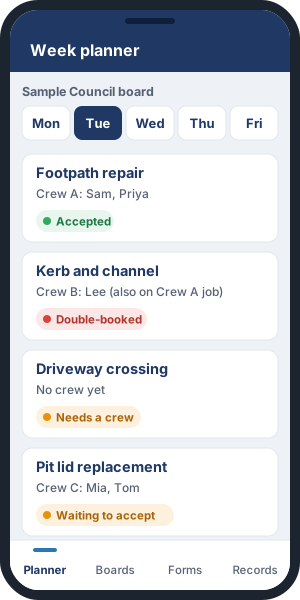
- A crew member is double-booked, or a job has no one assigned
You fix problems early, while they're still cheap.
Projects
Run capital works with full control.
- Set up the budget from your tender
- Break it into stages
- Watch cost against budget by category as labour, plant and materials go in
- Crews raise variations from site, with photos
- The office prices, reviews and approves them
- See the health of each job at a glance: green, amber or red
Maintenance
Council work orders, priced and done.
- Work orders go straight onto the right board
- They price themselves from the client's rate schedule
- Schedule them and send the crew
- Capture photos and measurements on site
- Close them out when the work is done
- Hundreds of small jobs, all tracked and none forgotten
Plan the week and crew on site
Everyone knows where they're going and what to do.
- One weekly planner for every project and maintenance job
- Drag and drop crews and plant, and clashes show up before anyone turns up on site
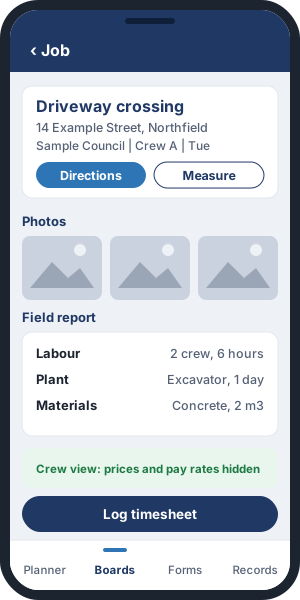
- Crews get addresses, directions, drawings, permits and photos on their phone
- Crews file field reports and timesheets from site
- Works offline
- Crews never see prices
Forms and compliance
Safety paperwork done on site and filed automatically.
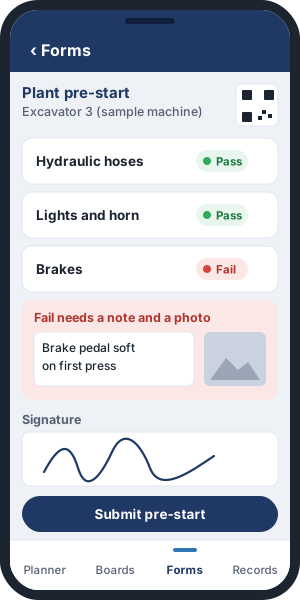
- Build your own pre-starts, checklists, inductions and toolbox forms
- Add photo and signature fields
- Crews fill them in on site, even with no signal
- Once a form is submitted it's locked, so a correction means voiding it and filing it again
- The plant register, ticket tracking and service reminders keep you audit-ready
See your business on one screen.
Next step: we'll walk through a live project and a maintenance job from quote to cost, alerts included.
Book a demo